
Removing backgrounds from product photos: a practical guide
Updated September 28, 2026 · Inpainting.app
A clean cut-out is one of the most useful edits for anyone who sells online: a product on a transparent or pure white background drops into a catalogue, a marketplace listing, a slide or a banner without any extra work. AI background removal gets you most of the way in a second. This guide explains how to get cut-outs that need no touch-up, using real results from the Inpainting.app background remover.
What the AI actually does
A background removal model does not "cut along edges" the way a magic wand tool does. It looks at the whole image, decides which region is the main subject, and produces an alpha matte: a grey-scale map where white means "keep", black means "remove", and the greys in between describe soft edges such as hair, fur or motion blur. The matte is applied as the transparency of your original pixels, so colours and resolution stay untouched.
That design has one big consequence: the model has to guess what the subject is. With one clear product in the middle of the frame the guess is easy. With several objects of similar importance, the model may keep some of them and drop others.

Original

Cut-out: cup, saucer and spoon kept, table removed
Shoot for an easy cut-out
A few minutes spent on the photo saves far more time than any editing afterwards.
- Contrast wins. A dark product on a light surface, or a light product on a dark one, gives the model a clear boundary. A white mug on a white table is the hardest case there is.
- Fill the frame, but leave a margin. The model looks at the photo at about 1024 × 1024 pixels internally, so a tiny product in a huge empty scene gets fewer pixels of attention. Crop so the product fills most of the frame, without cutting off any part of it.
- Soft, even light. Hard shadows are often treated as part of the object. Shoot near a window or with a diffuser, and keep the product a little away from the wall behind it.
- One product per photo. For group shots, the model may decide that only the front item is the subject.
People and portraits
The same tool works for profile pictures, team photos and ID-style portraits. In the example below the flag and the model shuttle behind the astronaut are removed, while the helmet she holds is kept as part of the subject. Loose hair against a busy background remains the hardest detail for any model; a plain wall behind the person helps a lot.
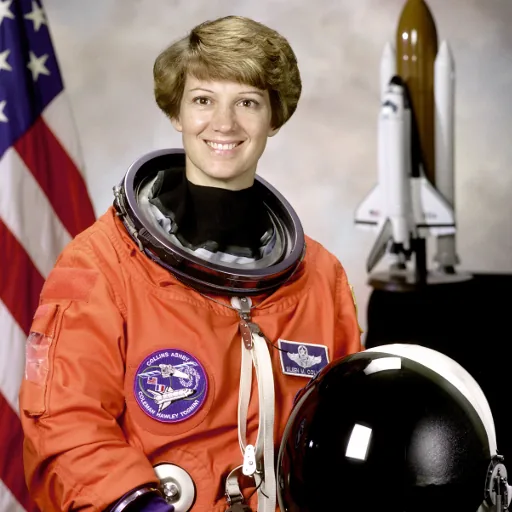
Original (NASA, public domain)
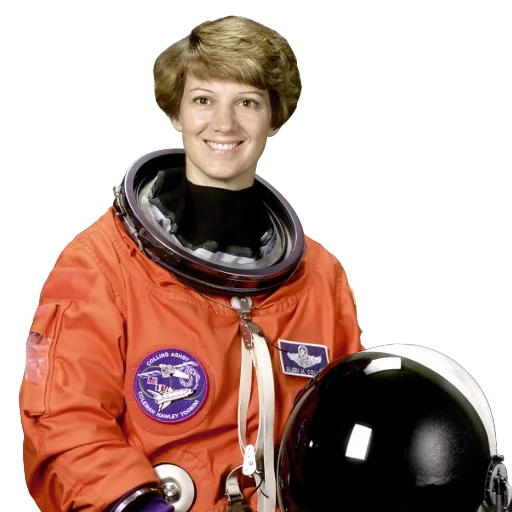
Cut-out: flag and shuttle model removed
Transparent, white or a colour?
After the cut-out you can keep the background transparent or fill it before downloading.
- Transparent PNG is the most flexible: use it in design tools, presentations and web pages, and put it on any background later.
- White is what most marketplaces expect for main product images. Amazon, for example, requires a pure white background for the main image of a listing. Choose White before downloading and the removed areas are filled with pure white (RGB 255, 255, 255); zoom in on the edges afterwards, since faint leftovers of the old background can tint the white slightly.
- A brand colour is useful for social posts and banners. Pick any colour with the colour picker.
What still needs a manual touch
Knowing the weak spots lets you check them before you publish.
- Glass and transparent plastic. The matte cannot represent "see-through" perfectly; bottles and glasses may come out partly transparent or keep a patch of background.
- Thin parts: cables, straps, jewellery chains and plant stems can be cut short.
- Shadows. The model removes the shadow a product casts on the table. Many shops add a soft shadow back in a design tool so the product does not look like it is floating.
- Objects the model did not see as the subject. If something you wanted to keep disappears, crop the photo tighter around the product and run it again.
Model and licence
Cut-outs are made by RMBG-1.4 by BRIA AI, running entirely in your browser. On a computer with WebGPU it takes well under a second; otherwise it runs on your processor in a few seconds. We tested several open models for this page, including newer ones that produced cleaner cut-outs on our test set, but they need more memory than a browser tab can provide today. RMBG-1.4 is published for non-commercial use. That is why the background remover page on this site carries no advertising, and if you plan to use cut-outs commercially you should review BRIA's licensing terms.
Privacy
Product photos of unreleased items and portraits are exactly the kind of image you may not want to upload to a stranger's server. Here the model is downloaded once, after you agree, and the photo is processed on your own device. Nothing is uploaded, and the model stays cached in your browser for next time.
Example photos: coffee cup (Rachel Michetti) and cat (Stefan van der Walt), CC0; Falcon 9 launch pad (SpaceX) and Eileen Collins (NASA), public domain. All results shown were produced with the tools on this site.