
AI image upscaling explained: what it can and cannot recover
Updated September 28, 2026 · Inpainting.app
Enlarging a small image used to mean choosing how blurry you wanted it to be. AI upscalers changed that: instead of spreading the existing pixels thinner, they draw new detail that looks like it belongs there. The results can be striking, but they are also easy to misunderstand. This guide explains what the Inpainting.app image upscaler does, when it helps, and where its limits are.
Ordinary resizing versus AI upscaling
Classic resizing methods such as bilinear or bicubic interpolation compute each new pixel as a weighted average of its neighbours. They never add information, so a 4× enlargement of a 100-pixel-wide image is a smooth, soft 400-pixel image. Edges become gradients and textures turn to mush.
An AI upscaler such as Real-ESRGAN is a neural network trained on millions of pairs of images: a sharp original and a deliberately damaged, shrunken copy of it with blur, noise and JPEG compression. By learning to undo that damage, it learns what sharp edges, fur, fabric and foliage usually look like, and it redraws them at the higher resolution.
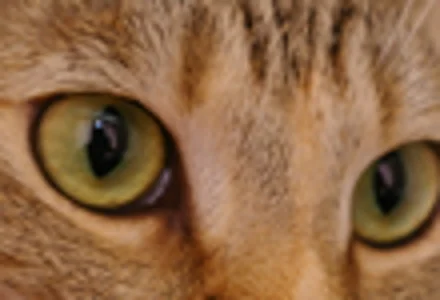
Bicubic resize, 4×
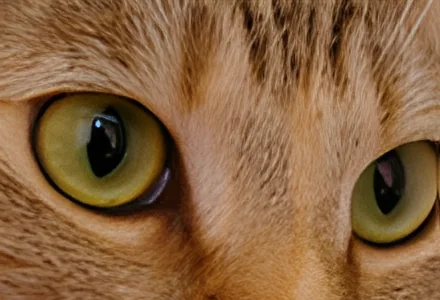
AI upscale (Real-ESRGAN x4plus), 4×
The important caveat: new detail is invented detail
Look closely at the fur in the AI version. It is convincing, but it is not the cat's actual fur: that information was not in the 110-pixel crop. The model drew fur that is consistent with a cat. For photos of landscapes, pets, food or products that is usually exactly what you want. It becomes a problem when the detail matters as evidence or identity:
- Faces can come out subtly different from the real person, especially from very small sources.
- Text and numbers such as licence plates or small print cannot be recovered; the model may draw shapes that look like letters.
- Scientific, medical or legal images should never be upscaled with a generative model if the result will be used to make decisions.
Which model to choose
The upscaler offers two Real-ESRGAN models, converted to ONNX from the weights released by the original authors.
- Fast (General x4v3, 5 MB) is a compact network that handles most photos well and runs quickly everywhere, including on computers without WebGPU. It tends to produce smooth, clean results.
- Sharper (x4plus, 34 MB) is the larger, classic Real-ESRGAN model. It produces crisper edges and more texture, and it is what the example above uses. It needs a browser with WebGPU, such as recent Chrome, Edge or Safari; on a processor alone it would take minutes per image.
Both models always enlarge by four internally. When you choose 2×, the 4× result is scaled down by half with high-quality filtering, which usually looks better than a native 2× model.
When upscaling helps most
- Photos saved from messaging apps, which shrink and compress images.
- Old phone and digital camera photos from the 2000s.
- Product photos and thumbnails that need to fill a larger slot on a website.
- Screenshots and illustrations with clean lines.
It helps least on images that are already large and sharp. Upscaling a 12-megapixel phone photo mostly makes the file bigger.
Size limits
Upscaling happens in tiles, so memory use stays manageable, but the finished image still has to fit in your browser's memory. The tool keeps the 4× result under 8192 pixels on the longest side and about 36 megapixels in total. If your image is larger, it is reduced before upscaling and the tool tells you so. For very large photos, crop to the part you need first.
Tips for the best result
- Start from the best copy you have: the original file, not a screenshot of it.
- Crop before you upscale, so the model spends its effort on the part you will use.
- Use Hold to compare to check for invented detail in faces or text.
- Download as PNG; if you need a smaller file, convert to high-quality JPEG or WebP afterwards.
Privacy
The upscaler runs on your device. The model is downloaded once after you agree, cached by your browser, and your images are never uploaded.
Example photos: coffee cup (Rachel Michetti) and cat (Stefan van der Walt), CC0; Falcon 9 launch pad (SpaceX) and Eileen Collins (NASA), public domain. All results shown were produced with the tools on this site.