
How it works
- Add an image. Choose, drop or paste a picture.
- Pick 2× or 4×. Choose the scale and a model, then press Upscale.
- Download. Compare with the original and save a high-resolution PNG.
Example
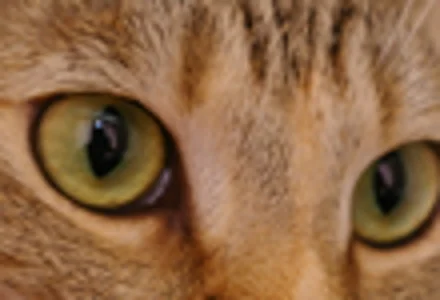
Ordinary resize, 4×
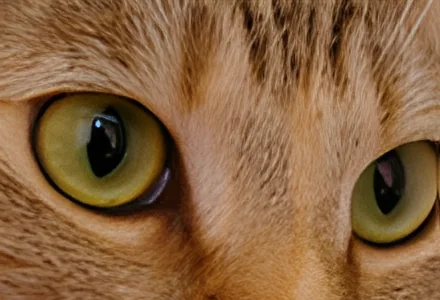
AI upscale, 4×
Want better results? Read the full guide: AI image upscaling explained: what it can and cannot recover.
When AI upscaling helps
Old phone pictures, screenshots, thumbnails, images saved from chat apps and small product photos all benefit. Unlike simple resizing, the AI adds plausible detail and removes JPEG blockiness instead of just making pixels bigger.
Fast and sharper models
The fast model (Real-ESRGAN General x4v3, 5 MB) handles most photos quickly. The sharper model (Real-ESRGAN x4plus, 34 MB) produces crisper edges but needs a WebGPU-capable browser. To keep your device responsive, very large results are capped at 8192 pixels per side.
Frequently asked questions
Are my photos uploaded?
No. The AI model is downloaded to your browser and runs on your own device. Your photos and the results never leave your computer or phone, and nothing is stored on our servers.
Why is there a download the first time?
The AI model has to be on your device to work offline and privately. It is downloaded once, only after you agree, and kept in your browser cache, so later visits start instantly without downloading it again.
How fast is it?
With WebGPU (recent Chrome, Edge and Safari) most photos finish in about a second. Without WebGPU the tool falls back to your CPU, which works everywhere but can take several seconds or more for large images.
What is the maximum size?
Upscaled images are limited to 8192 px on the longest side and about 36 megapixels. Larger inputs are reduced first so the tool does not run out of memory.
More free tools
- Remove unwanted objects from photos — Free AI object remover
- Remove the background from any image — Free background remover
- Remove text, stamps and logos from photos — Free watermark & text remover